GPS Icon Missing While Xopoz Requests GPS
An ADB investigation on an Honor 9 (EMUI 9.1, Android 9): the status bar hides the location icon after the phone’s own GPS daemon crashes
The issue
While the Xopoz map screen is open, Xopoz is always in active mode. It asks Android for a GPS position every 10 seconds and keeps that request open for as long as the map is visible. Android shows the location icon in the status bar while an app uses GPS, so with the map open, the icon should be there the whole time.
On an Honor 9, we saw something different. When the map screen opened, the location icon appeared for about 10 seconds and then disappeared. Xopoz stayed on the map screen and never closed its GPS request. To the user, it looked as if Xopoz had stopped using GPS.
This article follows the investigation with ADB, step by step. It shows what Xopoz, the location service, the GPS hardware and the operating system were each doing when the icon disappeared.
❓ Short answer
The status-bar location icon is drawn by Android, not by Xopoz. On the phone we examined, the icon appeared for about 9 seconds and then disappeared, even though Xopoz still had an active GPS request and the GPS chip was still powered on. At that exact moment the phone’s GPS daemon (gpsd, part of the operating system) crashed and restarted. Android then stopped flagging the request as high-power location use, and that flag is what shows the icon. Xopoz did nothing at that moment.
⚠️ A missing icon is not proof that GPS is off, and an icon is not proof that GPS works
On this phone the GPS daemon was crashing in a loop, about every 24 seconds. While it does that, it never gets a satellite fix. Xopoz kept its GPS request open but received only network positions (about 100 m accuracy). The icon was gone, but the real problem was a GPS failure inside the operating system.
Test device
All values below were read from the phone with adb shell getprop and adb shell uname -a during the investigation.
HONOR/STF-L09/HWSTF:9/HUAWEISTF-L09/9.1.0.220C432:user/release-keysgps,network enabled; automatic date/time and time zone onadb shell getprop ro.build.fingerprint HONOR/STF-L09/HWSTF:9/HUAWEISTF-L09/9.1.0.220C432:user/release-keys adb shell getprop ro.build.version.emui EmotionUI_9.1.0 adb shell getprop ro.build.version.release 9 adb shell getprop ro.build.version.sdk 28
What the user saw
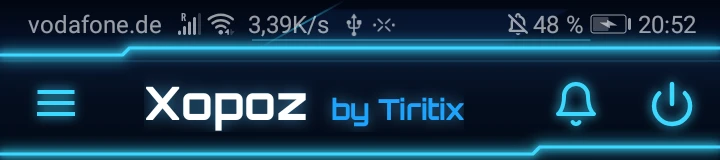
This screenshot was taken 1 minute 24 seconds after Xopoz requested GPS. The map screen is still open, and the location icon is gone:
How Android 9 decides to show the location icon
Android keeps a record of what each app does with location, called app-ops (app operations). Three of them matter here:
| App-op | Meaning |
|---|---|
GPS |
The app is using the GPS provider. Stays “Running” while the request is open. |
MONITOR_LOCATION |
Android counts the app as currently receiving location. |
MONITOR_HIGH_POWER_LOCATION |
Android counts the app as using high-power (GPS) location. On Android 9, this is the signal the status bar uses to show the location icon. |
Xopoz cannot set or clear these app-ops itself. Android sets them when an app opens a location request and clears them when the request ends, or when Android decides the request is no longer high-power.
Investigation step by step
The phone was connected with USB debugging. The commands below are standard ADB commands that anyone can run. Personal data (coordinates, account identifiers) is masked or removed from the outputs.
1. Does Xopoz have an open GPS request?
adb shell dumpsys location
    gps:
      UpdateRecord[gps com.tbr.xopoz(10141 foreground) Request[ACCURACY_FINE gps requested=+10s0ms fastest=+10s0ms lowPowerMode=false]]
...
    com.tbr.xopoz: gps: Min interval 0 seconds: Max interval 10 seconds: Duration requested 675 total, 675 foreground, out of the last 1773 minutes: Currently active
Finding: yes. Android’s location service shows an open request from Xopoz on the gps provider, every 10 seconds, with the app in the foreground. The request is currently active.
2. Is the GPS chip powered on?
adb shell dumpsys batterystats --history | grep -E "[+-]gps"
    +1d05h29m35s239ms (2) 048 -gps +top=u0a72:"com.huawei.android.launcher"
    +1d05h29m36s874ms (2) 048 +gps +top=u0a141:"com.tbr.xopoz"
(no -gps line after this one, checked again at 20:59:03)
Finding: yes. The battery history logs every time the GPS hardware turns on (+gps) or off (-gps). Times are offsets from the last reset of the battery statistics (2026-10-03 15:21:55), so +1d05h29m36s is about 20:51:32, give or take a second or two. The chip turned on when Xopoz came back to the front and was never turned off afterwards.
3. Does Android still count it as high-power location use?
adb shell dumpsys appops
  Uid u0a141:
    state=top
    Package com.tbr.xopoz:
      GPS (allow / switch COARSE_LOCATION=allow):
          Access: top   = 2026-10-04 20:51:33.464 (-1m36s615ms)
          Running start at: +1m36s615ms
      MONITOR_LOCATION (allow / switch COARSE_LOCATION=allow):
          Access: top   = 2026-10-04 20:51:42.121 (-1m27s958ms)
          duration=+8s656ms
      MONITOR_HIGH_POWER_LOCATION (allow / switch COARSE_LOCATION=allow):
          Access: top   = 2026-10-04 20:51:42.122 (-1m27s957ms)
          duration=+8s657ms
Finding: this is the key contradiction.
GPSis still Running, started at 20:51:33.464.MONITOR_HIGH_POWER_LOCATIONis no longer running. It lasted 8.657 seconds and ended at 20:51:42.122.MONITOR_LOCATIONended at the same millisecond.
8.6 seconds matches what the user saw: the icon appeared for about 10 seconds, then disappeared.
4. Did Xopoz change anything at 20:51:42?
adb exec-out run-as com.tbr.xopoz cat files/…/Logs/xopoz_2026-10-04.log
[20:51:33.450] [LocationPower] PowerMode: MODE_POWER_SAVE → MODE_ACTIVE (mapVisible:true)
[20:51:33.456] [LocationServ ] ---- requestLocationUpdates: Gps, Period=10s
[20:51:33.466] [LocationServ ] ---- NETWORK requesting updates as indoor fallback
[20:51:33.478] [LocationServ ] ---- Continuous GPS + NETWORK updates started successfully
[20:51:35.985] [LocationHand ] ---- LocationCallback: [network] lat=…, lon=…, acc=100m
(no Xopoz location call between 20:51:33.478 and 20:51:42.122)
[20:52:15.988] [LocationHand ] ---- LocationCallback: [network] lat=…, lon=…, acc=100m
[20:52:56.001] [LocationHand ] ---- LocationCallback: [network] lat=…, lon=…, acc=100m
Finding: no. Xopoz opened its GPS request at 20:51:33 and did not stop, change or renew it. After that it received network positions only (100 m accuracy) and no GPS position at all.
Note: run-as works only with a debuggable build of Xopoz. With the Play Store build, use Send a support ticket with Include log files from the left menu instead.
5. What happened in the operating system at 20:51:42?
adb logcat -d -v time -b all
10-04 20:51:33.465 D/libgps  (  756): proxy_gps_start: called.
10-04 20:51:33.470 I/FusionD (  772): (fd_start_gnss:1070):gnss start.
10-04 20:51:40.091 D/libgps  (  756): proxy_gnss_sv_status_cb: called. num_svs(4)
10-04 20:51:42.097 D/libgps  (  756): proxy_gnss_sv_status_cb: called. num_svs(4)
10-04 20:51:42.099 E/gpsd    (17648): ASSERT in GlGpsdInterface.cpp:1423: Abnormal GlEngine stop. Initial time estimate was bad#ERR4
10-04 20:51:42.117 D/libgps  (  756): reset_wakelock: called.
10-04 20:51:42.187 D/        (17775): gps client init!
10-04 20:51:42.243 D/libgps  (  756): proxy_gps_start: called.
10-04 20:51:42.243 I/FusionD (  772): (fd_start_gnss:1061):gnss start again.
10-04 20:51:42.380 D/libgps  (  756): proxy_gps_xtra_download_request_cb: called.
10-04 20:51:42.893 D/libgps  (  756): proxy_gnss_sv_status_cb: called. num_svs(0)
Finding: 23 milliseconds before Android cleared MONITOR_HIGH_POWER_LOCATION, the GPS daemon gpsd (process 17648) hit an internal assertion and stopped: “Abnormal GlEngine stop. Initial time estimate was bad”. A new gpsd process (17775) started and the GNSS engine was started again (“gnss start again”), with 0 satellites in view.
6. Is it a one-off?
adb logcat -d -v time | grep "ASSERT in GlGpsdInterface" | grep -v "We find"
10-04 20:50:17.754 E/gpsd (17024): ASSERT in GlGpsdInterface.cpp:1423: Abnormal GlEngine stop. Initial time estimate was bad#ERR4
10-04 20:50:53.537 E/gpsd (17203): ASSERT …
10-04 20:51:18.311 E/gpsd (17450): ASSERT …
10-04 20:51:42.099 E/gpsd (17648): ASSERT …
10-04 20:52:11.932 E/gpsd (17775): ASSERT …
10-04 20:52:35.762 E/gpsd (17891): ASSERT …
10-04 20:52:59.567 E/gpsd (17926): ASSERT …
10-04 20:53:23.385 E/gpsd (17978): ASSERT …
… 17 crashes in total between 20:50:17 and 20:59:00, each with a new process ID
10-04 20:59:00.155 E/gpsd (19147): ASSERT …
Finding: no. The GPS daemon was in a crash loop, restarting about every 24 seconds. After each restart the number of satellites in view starts again from 0 and never went above 4, so no fix was ever produced. The system log on the phone goes back to 12:35 that day and contains no such crash before 20:50:17.
Timeline
| Time (CEST) | Source | Event |
|---|---|---|
| 20:50:17 | logcat | First gpsd crash of the series |
| 20:51:33.456 | Xopoz log | Map visible → active mode → GPS requested every 10 s |
| 20:51:33.464 | app-ops | GPS running, MONITOR_HIGH_POWER_LOCATION starts → icon appears |
| ≈ 20:51:32 | batterystats | +gps: chip powered on |
| 20:51:42.099 | logcat | gpsd ASSERT: “Abnormal GlEngine stop” |
| 20:51:42.122 | app-ops | MONITOR_HIGH_POWER_LOCATION ends after 8.657 s → icon disappears |
| 20:51:42.243 | logcat | New gpsd process, “gnss start again” |
| 20:52:57 | screenshot | Xopoz in front, no location icon |
| 20:59:03 | dumpsys | Xopoz GPS request still active, chip still on, still no GPS fix |
Conclusion
- Xopoz requested GPS and kept the request open the whole time (location service, app-op
GPSrunning, Xopoz log). - The GPS hardware stayed powered on (battery history: no
-gps). - The icon disappeared because Android ended the high-power flag, 23 ms after the OS GPS daemon crashed. Xopoz made no call at that moment.
- The cause is inside the operating system: the vendor GPS daemon was crashing in a loop with an internal assertion about a bad initial time estimate.
So on this phone, the location icon may not appear even though Xopoz needs GPS and has asked for it. Its absence comes from an operating-system fault, not from a decision by Xopoz. In this state the phone also delivers no GPS position, so Xopoz falls back to network positions.
After a reboot
The phone was then restarted. After the restart, with Xopoz open on the map screen, the location icon stayed in the status bar the whole time, as expected.
This is consistent with the analysis. A restart starts the GPS daemon from a clean state and ends the crash loop. As long as gpsd does not crash, Android keeps MONITOR_HIGH_POWER_LOCATION running and the icon stays visible.
⚠️ The reboot clears the symptom, not the cause
The fault is inside the phone’s GPS software, and the restart only resets it. The crash loop began after a long period of normal operation. It can come back, and with this firmware there is nothing an app can do to prevent it.
Known issue? Firmware update?
We searched public sources for the exact error (GlGpsdInterface.cpp:1423, “Abnormal GlEngine stop. Initial time estimate was bad”) and found no report of it. gpsd is closed, manufacturer-supplied software, so its error messages are rarely published. Users have reported general GPS problems on Huawei and Honor phones after updating to EMUI 9.0, 9.1 and 10 (signal lost, positions jumping), but no single fix has been found.
| Test phone | Public firmware listings | |
|---|---|---|
| EMUI | 9.1.0 | 9.1 is the last major version for the Honor 9. It never received EMUI 10. |
| Build | 9.1.0.220 (C432E2R1P5), Huawei build 9.1.0.231 (C432E4R1P5) | Newest builds listed: 9.1.0.210 to 9.1.0.221. 9.1.0.231 does not appear in any listing we found. |
| Security patch | 2020-05-01 (build dated June 2021) | No newer patch level found |
Result: the test phone runs the newest firmware we could find, or a newer one. The Honor 9 no longer receives updates, so no firmware fix for this crash should be expected.
Sources: Huawei Central, XDA Forums, Wikipedia: Honor 9, GSMArena, firmware.center, mobilebaz.
What this analysis does not show
- Why
gpsdcrashes. The message points to a bad initial time estimate in the GNSS engine. Automatic date and time were on. The daemon is closed vendor code. - How often it happens. It was seen once, on one Honor 9, during a 9-minute session. Earlier the same evening the same phone delivered GPS fixes of 11–13 m accuracy without any crash.
- Every case of a missing icon. The same user also saw no icon earlier that evening while GPS was working normally. The app-op record for that moment had already been overwritten, so that case could not be analysed.
- Other phones. Other Huawei, Honor or Android 9 phones were not tested.
Check it on your own phone
With USB debugging on and Xopoz open on the map, run these commands. If the first two show Xopoz using GPS but the third shows MONITOR_HIGH_POWER_LOCATION with a short duration instead of Running, look for the GPS daemon messages with the fourth.
| Question | Command | Healthy result |
|---|---|---|
| Does Xopoz request GPS? | adb shell dumpsys location | grep "gps com.tbr.xopoz" |
UpdateRecord[gps com.tbr.xopoz …] |
| Is the chip on? | adb shell dumpsys batterystats --history | grep -E "[+-]gps" | tail -3 |
Last line is +gps |
| Does Android count it as GPS use (icon)? | adb shell dumpsys appops --package com.tbr.xopoz |
MONITOR_HIGH_POWER_LOCATION shows Running |
| Is the GPS daemon crashing? | adb logcat -d | grep -iE "gpsd|ASSERT|GlEngine" |
No ASSERT lines |
| Are GPS positions arriving? | adb shell dumpsys location | grep "Location\[gps" |
A recent fix with small hAcc (a few metres) |
✅ What you can try
- Restart the phone. This starts the GPS daemon from a clean state. On the test phone, the location icon stayed visible on the map after a restart.
- Check date and time: Settings → System → Date & time → Automatic date & time on.
- Go outdoors with a clear view of the sky for a few minutes so the GPS can get a first fix.
- If the crash loop keeps coming back: users report clearing the downloaded satellite-assistance (A-GPS) data with a GPS test app, reinstalling EMUI 9.1 with HiSuite, or a factory reset. These have not been tested for this crash.
- Send a support ticket from the Xopoz left menu with Include log files checked. We can tell from the logs whether Xopoz received real GPS positions.
Related articles
See “System killed Xopoz”: Crash or Not? for the battery settings Huawei and Honor phones need, Android GPS Configuration for general GPS setup, and Location Providers for GPS versus network positions.
🔍 Key Takeaways
- The icon belongs to Android: it follows the
MONITOR_HIGH_POWER_LOCATIONapp-op, which Xopoz cannot control. - Seen on Honor 9, EMUI 9.1, Android 9: the icon vanished 23 ms after the phone’s GPS daemon crashed, while Xopoz’s GPS request stayed open.
- The daemon was in a crash loop (17 crashes in 9 minutes), so the phone delivered no GPS fix at all and Xopoz fell back to network positions.
- A restart cleared it: afterwards the icon stayed visible on the map. The fault can return.
- No firmware fix expected: the Honor 9 stopped at EMUI 9.1, and the test phone already runs the newest build we could find.
- Not sure what your phone is doing? Send a support request from inside Xopoz and we will check your logs.