Emergency SOS
Send an encrypted distress alert with your GPS location to all members of your team. The screen is designed for use under stress, with very large text and one big red button.
Important Limitations — Read First
This is NOT a one-touch panic button. The SOS system requires several deliberate steps to prevent accidental activation. It is designed to complement your existing safety plan, not replace it.
- Requires internet. Emergency messages cannot be sent or received without an active network connection. If the network is down, the alert is queued and sent when the connection returns.
- Team only. Alerts are sent to your Xopoz team members only — not to emergency services (911, 112, etc.).
- Requires a team. If you are not a member of any team, the Alert entry shows “You must be inside a team to send an alert”.
- Not instant delivery. Recipients receive the alert when their device next synchronises with the server.
Always call official emergency services first in life-threatening situations. Use the Xopoz SOS to alert and coordinate with your team after contacting 112, 911 or your local emergency number.
Sending an SOS Alert
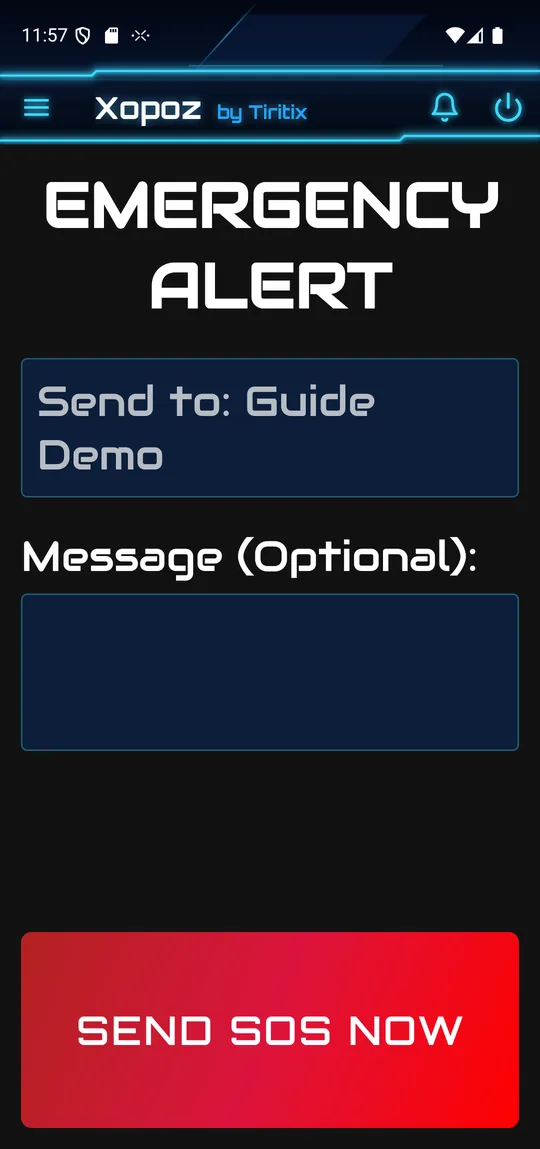
- Open the side menu and tap the red Alert tile (marked SOS).
- If you belong to several teams, a dialog asks you to select the target team(s). Cancel is on the left, Send SOS on the right. With a single team this step is skipped.
- The EMERGENCY ALERT screen shows the recipients (Send to: …).
- Optionally type a short message. Your current GPS position is always included automatically.
- Tap the large red SEND SOS NOW button. The phone vibrates and the button reads SENDING EMERGENCY….
- A message confirms “Emergency alert sent to 1 team(s)!” and the screen closes. Without network you see “Alert queued for delivery — sending in background” instead.
To abort before sending, press the Back key.
Receiving an SOS Alert
When a team member sends an SOS, all other team members receive:
- A full-screen emergency popup titled Xopoz Sos received with an alarm ringtone. Stop Alarm silences the ringtone; Close this message dismisses the popup
- A high-priority persistent notification that stays until acknowledged
- The sender's device name and team context
- A direct link to navigate to the sender's last known GPS position on the map
Note: Your device's background location service must be running for alerts to be processed while the app is in the background. Allow Display Over Other Apps and Notification Permission in Settings so the alert can appear on the lock screen.
Security & Encryption
Emergency messages use the same end-to-end encryption as all team communications:
- Your GPS position is encrypted separately from the message text
- If you send to multiple teams, each team receives a differently-encrypted copy using its own key
- The server stores and routes encrypted data only — it cannot read your location or message
No Guarantee of Reliability
Xopoz is a location monitoring aid and does not claim to be 100% reliable. The application cannot be held responsible for incidents, accidents, or any adverse outcome arising from reliance on its features.
Emergency and field situations introduce numerous unpredictable factors entirely outside the application's control:
- User stress: under pressure, users may tap incorrect buttons, miss confirmation steps, or misread on-screen information.
- Insufficient battery: a device with low or depleted battery cannot send or receive alerts or maintain background services.
- Network connectivity: poor, intermittent, or absent mobile data or Wi-Fi will prevent SOS delivery and position sharing.
- GPS signal quality: dense buildings, underground locations, heavy foliage, or adverse weather can degrade or block GPS reception.
- Operating system behaviour: Android and modified Android distributions (such as EMUI, MIUI, ColorOS, OneUI) may exhibit unpredictable behaviour regarding real-time scheduling, background service management, and GPS access — potentially delaying or preventing alerts without warning.
- Device limitations: hardware defects or insufficient storage can impair operation.
- Human factors: forgetting to charge the device, not enabling location permissions, joining the wrong team, or misconfiguring settings.
- This list is not exhaustive. Other unforeseen factors may affect the application's operation.
Always treat Xopoz as a supplementary tool, not a primary safety system. Maintain independent emergency plans, backup communication methods, and always call official emergency services (112, 911, etc.) first.
Recommended Practice
| Situation | Action |
|---|---|
| Life-threatening emergency | Call 911 / local emergency services first, then send Xopoz SOS |
| Team coordination after incident | Use Xopoz SOS to keep team informed of your position |
| Remote area with no signal | Xopoz SOS will not work — use satellite communicator or other backup |
| Testing the feature | Inform your team before testing so they do not respond unnecessarily |
Before relying on Xopoz SOS in the field, verify that:
- All team members have the app running with background location active
- Everyone has internet connectivity in the area you will be working
- You have tested sending and receiving an alert at least once in a non-emergency context