GeoFencing
Receive automatic notifications when a team device enters or leaves a specific area. GeoFencing is built on your Points of Interest and works even when devices are temporarily offline.
What Is GeoFencing?
GeoFencing creates an invisible boundary around a location defined by a Point of Interest. When a monitored device crosses that boundary — entering or leaving — you receive an encrypted notification on your device.
Setting Up a GeoFence Rule
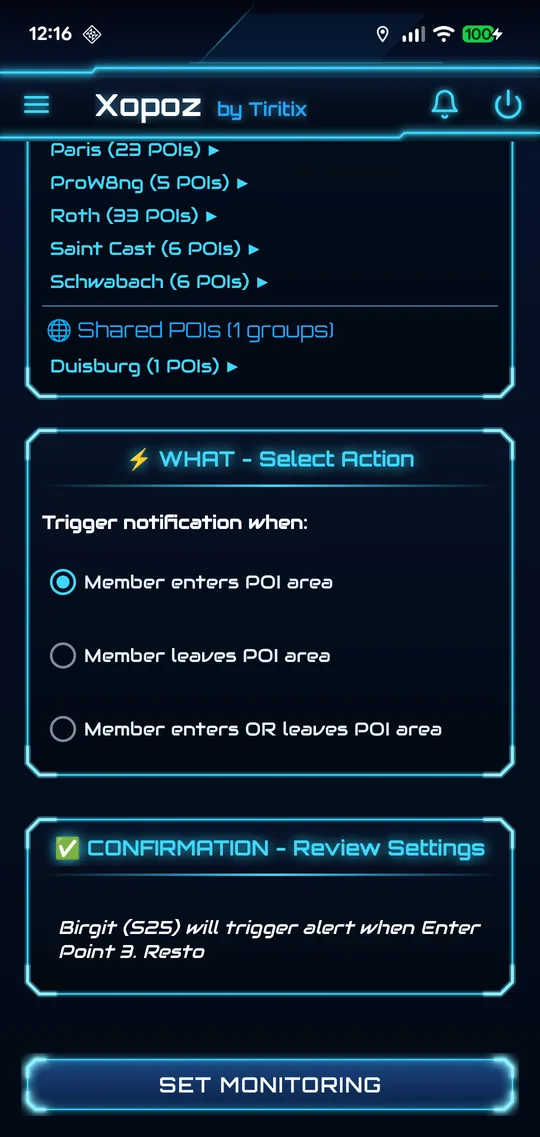
Open GeoFencing from the side menu. The screen has four panels, filled from top to bottom.
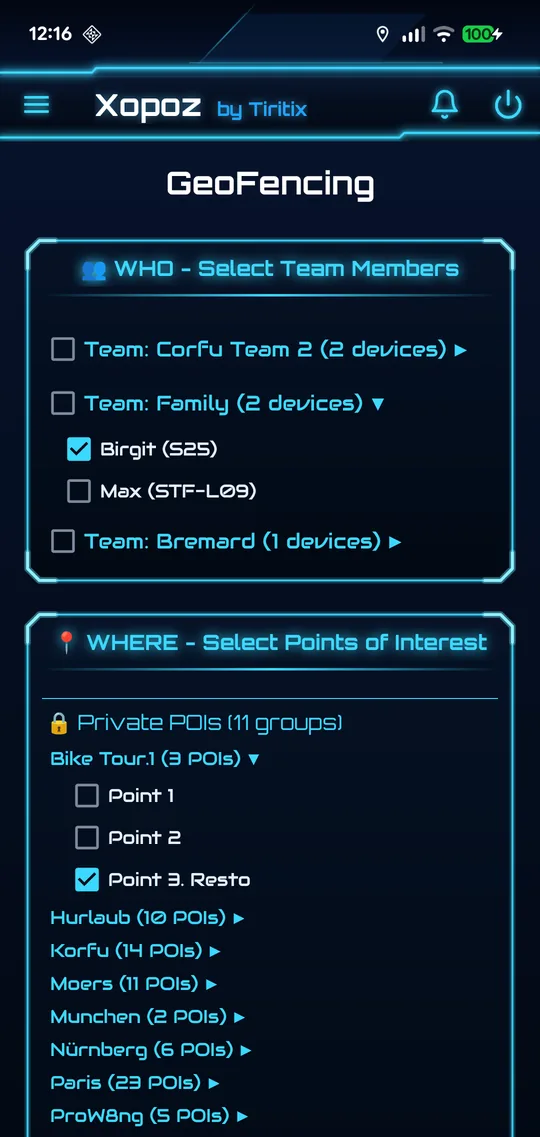
1. WHO — Select Team Members
- Devices are listed by team
- Select individual devices, or the team checkbox to select all of them at once
- Each device is an independent monitoring target
- If you are alone in your teams, the panel says No team members available — invite another device first
2. WHERE — Select Points of Interest
- Private POIs and Shared POIs are listed separately, grouped by folder
- Tap a folder name (▶) to expand it, then tick the POIs to monitor
- You can monitor several locations at the same time
3. WHAT — Select Action
- Member enters POI area — alert on entry
- Member leaves POI area — alert on exit
- Member enters OR leaves POI area — alert on both
4. CONFIRMATION — Review Settings
A summary of your choices is shown in plain language. It tells you what is still missing (for example Select team members to continue). The Set Monitoring button becomes active once everything is complete.
The monitored devices receive your request and can see that they are monitored.
GeoFencing Manager
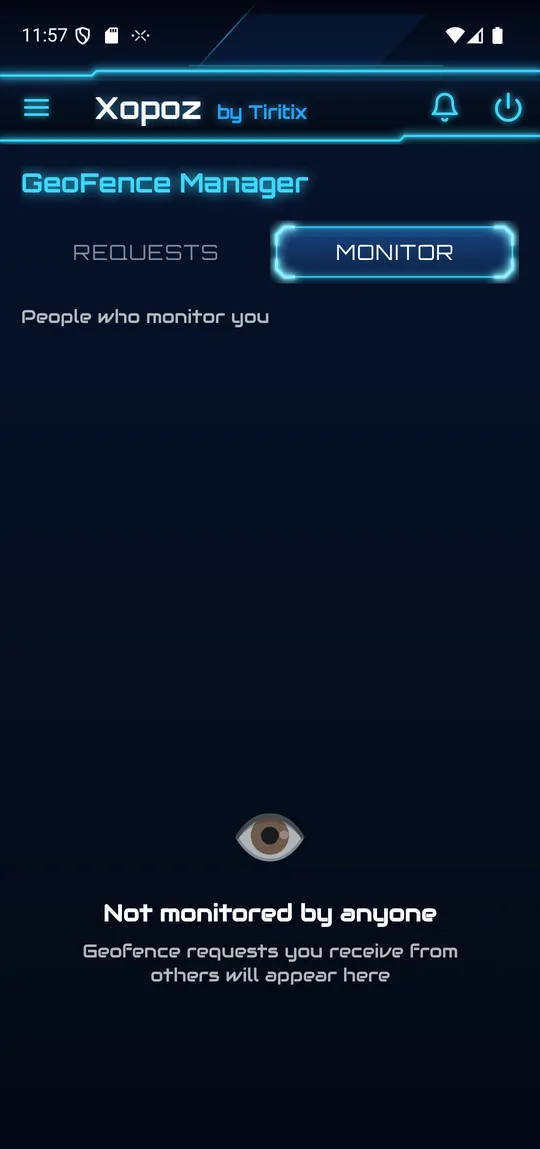
Open GeoFencing Manager from the side menu to review all rules. It has two tabs:
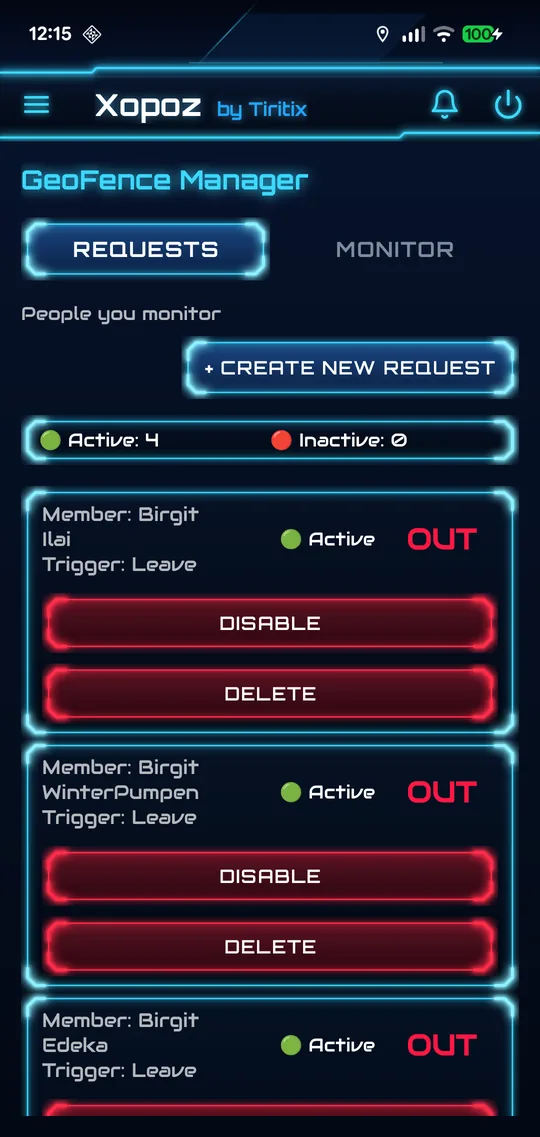
- Requests — the rules you created, with Active and Inactive counters. Each rule shows how many devices it monitors at how many locations, its state, and Disable / Delete buttons. + Create New Request opens the GeoFencing screen.
- Monitor — the requests other devices made about you: who monitors you, your distance to the zone and its radius, and whether you are in or out. Tap Deny to refuse a request.
Receiving GeoFence Alerts
When a boundary crossing is detected, you receive an encrypted notification containing:
- Event type: ENTERED or EXITED
- The device that triggered the event
- The name of the POI whose zone was crossed
- The time (time only for today's events; full date for older events)
Event History
All GeoFence events are kept in the Event Viewer (bell icon in the toolbar), sorted newest first. Use the filter to show only GEOFENCE_NOTIFY_ENTER or GEOFENCE_NOTIFY_LEAVE events.
- Tap an event to jump to the map and track that device's current location
- The map shows where the device is now, not where it was during the event
- History is persistent — it survives app restarts
How It Works
Xopoz uses device-side detection. Monitored devices detect their own boundary crossings locally and send encrypted notifications to your device via the team messaging system. No GPS data is processed on the server.
Offline Behaviour
If a monitored device detects a boundary crossing while it has no internet connection, the notification is queued locally. When connectivity is restored, all queued notifications are delivered automatically.
Privacy
All GeoFence notifications are encrypted with team-specific keys. The server routes encrypted messages without being able to read their content.